Workspace overview
The most important element in Ultra Fractal is the fractal window, which display the fractals that you work on. Additionally, you use the browser to organize your fractal-related files, and the formula editor if you want to write your own formulas.
Secondary windows, called tool
windows, edit the properties of fractals and provide access to other functionality.
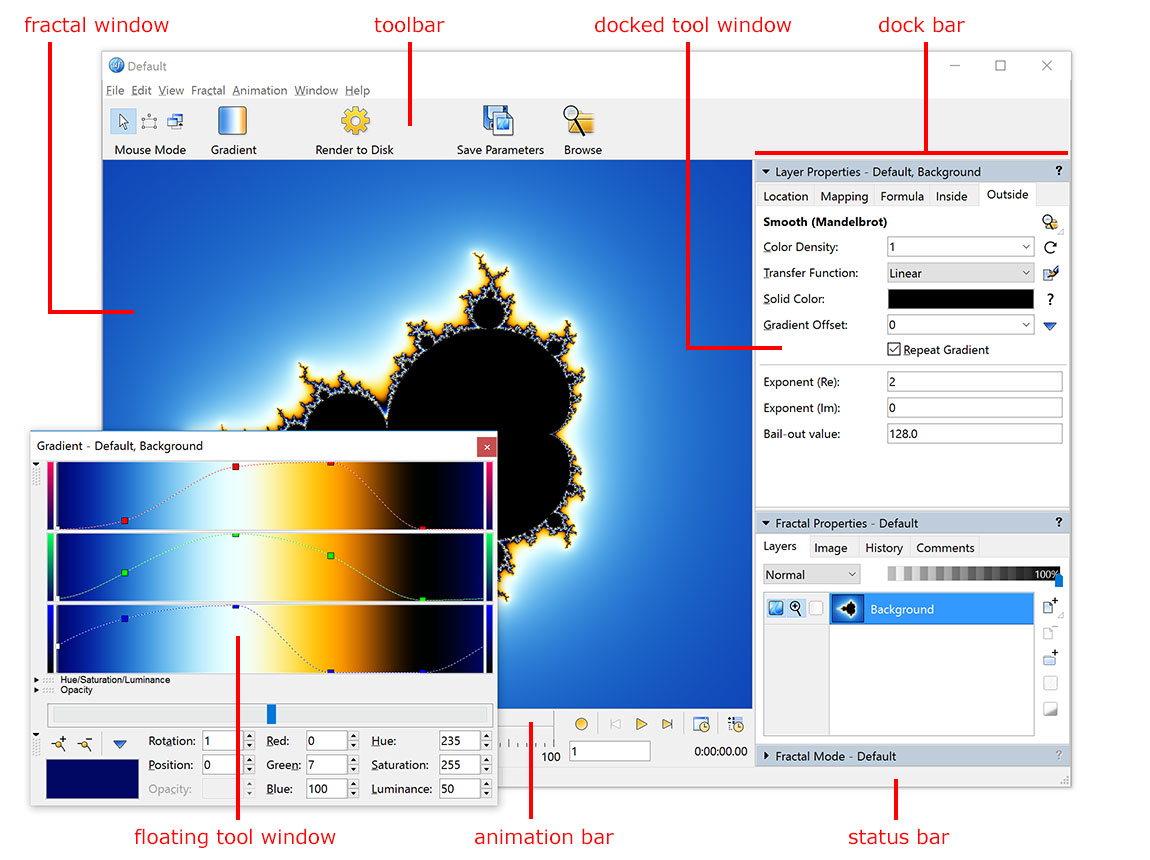
Ultra Fractal contains the following elements:
- Fractal windows contain the fractals that you work on. Other types of document windows are formula editors and browsers.
- The buttons on the toolbar provide access to frequently-used commands.
The toolbar can be hidden and restored by clicking
Show/Hide Toolbar on the View menu. To customize the toolbar, right-click it: a menu will appear that lets you choose which buttons you want to see and whether to use large or small icons.
- The dock bar in the fractal window is a place to store tool windows, to keep them from
using too much screen space. Tool windows can be dragged into and out of the
dock bar at any time. Tool windows in the dock bar are called docked tool
windows. They can also be collapsed so you only see the title bar. You can only dock tool windows that are related to the current fractal (for example, you cannot dock the Render tool window.)
- Floating tool windows are tool windows that float freely over the
screen, instead of being in the dock bar. This is useful if you use a tool
window a lot, or if you want to place tool windows on a secondary monitor. The Gradient tool window
often works better when floating than when docked.
- The animation bar contains animation controls. To hide and restore
the animation bar, click Show/Hide Animation Bar on the View menu. (Ultra Fractal Extended Edition only.)
- The status bar provides additional information about a window, such as the elapsed calculation time for a fractal. To hide and restore
the status bar, click Show/Hide Status Bar on the View menu.
On Windows, when you close the last fractal window, formula editor, or browser, Ultra Fractal quits automatically. This also stops any running render jobs. If you want to keep Ultra Fractal running, just keep a document window open. On a Mac, Ultra Fractal keeps running when you close the last document window. You only see the menu bar and any floating tool windows in this case.
Next: Working with tool windows
See Also
Tutorials
Fractal windows
Gradients